
Your next print, a little better
Drying filament: understanding PLA, PETG and nylon
Popping, strings or rough surfaces? Recognize possible moisture and distinguish active drying from dry storage.
If possible, compare with material known to be dry. Dry according to the data sheet for the specific filament and observe the spool's temperature limit. Afterwards, store the spool sealed with suitable desiccant.
Open the relevant troubleshooting helperCould this help someone else too? Share the free guide.
How do you recognise the problem?
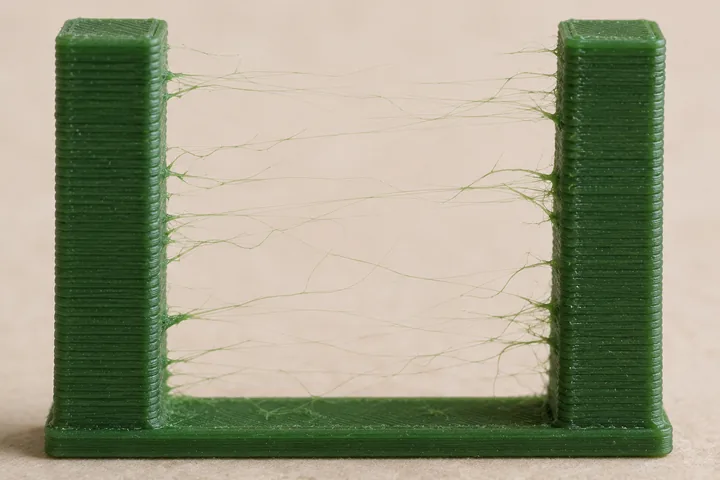
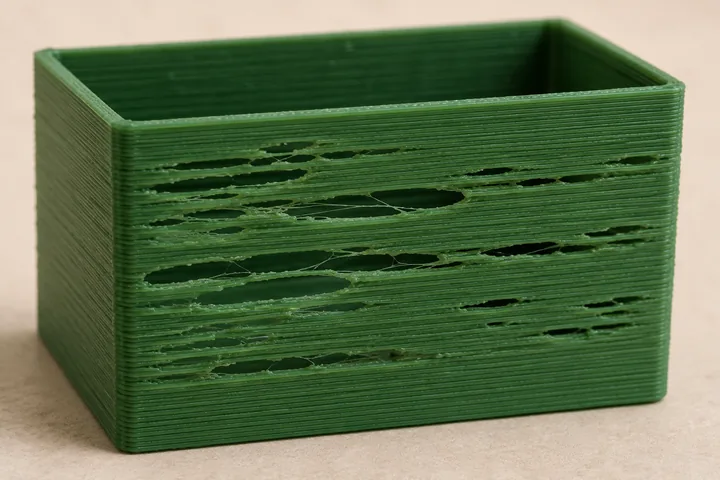
Popping noises, strings or an uneven surface can indicate moisture. However, the same symptoms can have other causes. A single photo does not prove a spool is damp.
| What you observe | What could be behind it | Your next step |
|---|---|---|
| Strings and popping | Moisture is possible but not proven. | Compare with a known spool. |
| Spool was left exposed for a long time | Storage conditions are a starting point. | Check the data sheet and suitable drying methods. |
| Dry spool also prints poorly | Temperature, profile or mechanics may be involved. | Go to the guide for the relevant symptom. |
From my reel vom 17 November 2026
Check the material and starting condition first.
My three quick tips start with the build plate, dry filament storage and suitable settings. For this guide, record the filament condition and profile before changing several settings.
My dry-storage tip prepares you for the next print. For active drying, follow your filament's data sheet for temperature and duration; a storage box alone does not prove that material is dry.
My three quick tips on Instagram Bild vergrößern
Watch my three quick tips on YouTube
Drei Soforttipps: Druckbett, Filament und Settings
Ich erkläre drei Ausgangspunkte für deinen nächsten Druck: das vorbereitete Druckbett, trockene Filamentlagerung und passende Settings. Ein kurzer Einstieg für die anschließende gezielte Fehlersuche.
Still stuck? Yener shows you the next steps in the video.
Clicking loads the YouTube player. Data such as your IP address is transmitted to Google. Privacy policy
Open the video on YouTube →Possible causes
- Open storage in humid surroundings
- Moisture uptake during longer prints
- Unsuitable storage or exhausted desiccant
- Another printing problem with a similar appearance
Narrow it down step by step
Change one thing at a time and compare using the same small test print. Check off the steps you have completed.
0 of 6 steps checked
Material genau bestimmen
Record the brand, exact type, color and spool type. PLA, PETG, PA and blends need different conditions. Even a shared material-family name does not provide sufficient temperature guidance.
Document the comparison print
Print a small model with a suitable profile and record sounds, surface appearance and strings. Do not change retraction or flow settings initially, so the material comparison remains clear.
Check the data sheet and spool limits
Use the manufacturer's temperature and duration for the specific product. The spool must also withstand that temperature. Choose a suitable device with controls and airflow designed for the task.
Materialgerecht trocknen
Follow the filament and dryer manufacturers' instructions. Avoid generic temperature tables that are not product-specific. Poorly controlled household appliances can damage the material or spool.
Store with protection
Afterwards, store the spool in a sealed box or suitable bag. When handled correctly, desiccant protects against further moisture uptake. Check its condition according to the relevant manufacturer's instructions.
Retest under the same conditions
Compare the same model and profile again. If the print improves, record the procedure. If the defect remains, continue checking temperature, material path and nozzle separately.
Dryboxes and filament dryers serve different purposes
A drybox keeps the surroundings dry during storage or printing. Active drying aims to reduce moisture already absorbed under suitable conditions. A container with desiccant does not automatically achieve the effect of a dryer operated correctly for the material.
When accessories become useful
Before buying, check approved materials, spool size, temperature control and intended operation. A dryer will not fix a clogged nozzle or replace suitable print profiles. Affiliate offers are labeled as advertising.
Your next comparison print
Trocknen und trocken lagern getrennt beurteilen
Notiere Material, Spulentyp und die Vorgaben des Filamentherstellers. Dokumentiere Temperatur und Dauer des Trocknungslaufs. Drucke dasselbe kleine Modell mit unverändertem Profil vor und nach dem Trocknen und vergleiche Geräusche, Fäden und Oberfläche. Ein Hygrometer in der Box misst die Luftfeuchtigkeit, nicht direkt die Feuchte im Filament.
A sealed box with desiccant keeps dry filament dry; it does not automatically replace a drying cycle.
Open the free test logA test plan for your own trial. The illustration above is an example; documented results from your printer come from the actual test.Testdrucke
Fünf Testdrucke im Überblick: Kalibrierwürfel, Brückentest, Temperaturturm, Stringing-Test und Überhangtest. Das Reel zeigt, welche Testmodelle du für die Druckvorbereitung kennenlernen kannst.
Watch the linked Reel here or open it directly on Instagram.
Clicking loads content from Instagram (Meta). Data such as your IP address is transmitted to Meta; Instagram may use cookies and similar storage. Privacy policy
Watch the video on Instagram →Slicer and material
These settings matter
- Dry according to the specific filament's data sheet
- Observe the spool's approved temperature limits
- Use the same print profile for comparison
- Protect against renewed moisture uptake after drying
For moisture-sensitive materials such as PA, dry feeding during printing may matter. Follow the recommendation for your actual material grade, not just the broad term nylon.
Frequently asked questions
Do I always need to dry PLA?
Not every PLA defect is caused by moisture. Consider storage and symptoms, and test with known-good material where possible.
What temperature does PETG need?
The manufacturer of your PETG grade provides the authoritative starting specification. Also check whether the spool and device are approved for it.
Is newly packaged filament always dry?
Packaging alone does not prove the material's condition. A controlled comparison is more helpful for troubleshooting.
Related guides for further reading
 AI example image
 AI example image
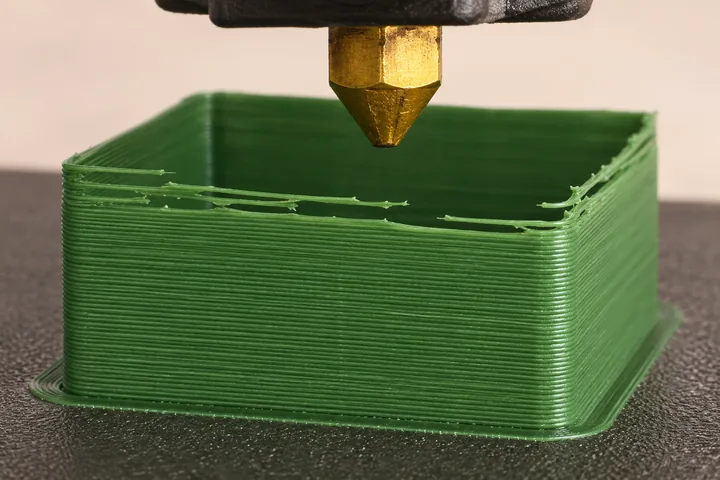 AI example image
Manufacturer information and further sources
This sequence of checks puts typical symptoms into context. Specific maintenance procedures always apply to the respective printer model.

Applies to FDM/FFF printing with filament. No automatic photo analysis. For hot, electrical or moving components, follow the manufacturer's safety and maintenance instructions.